Express Intro to Cricut Chat
Craft Pack
Thanks for joining us for an Express Intro to Cricut Chat!
In our express craft chat we touched on how you can use Cricut to create custom gifts, cards, stickers, scrapbooking details and more using cardstock, vinyls and other materials.
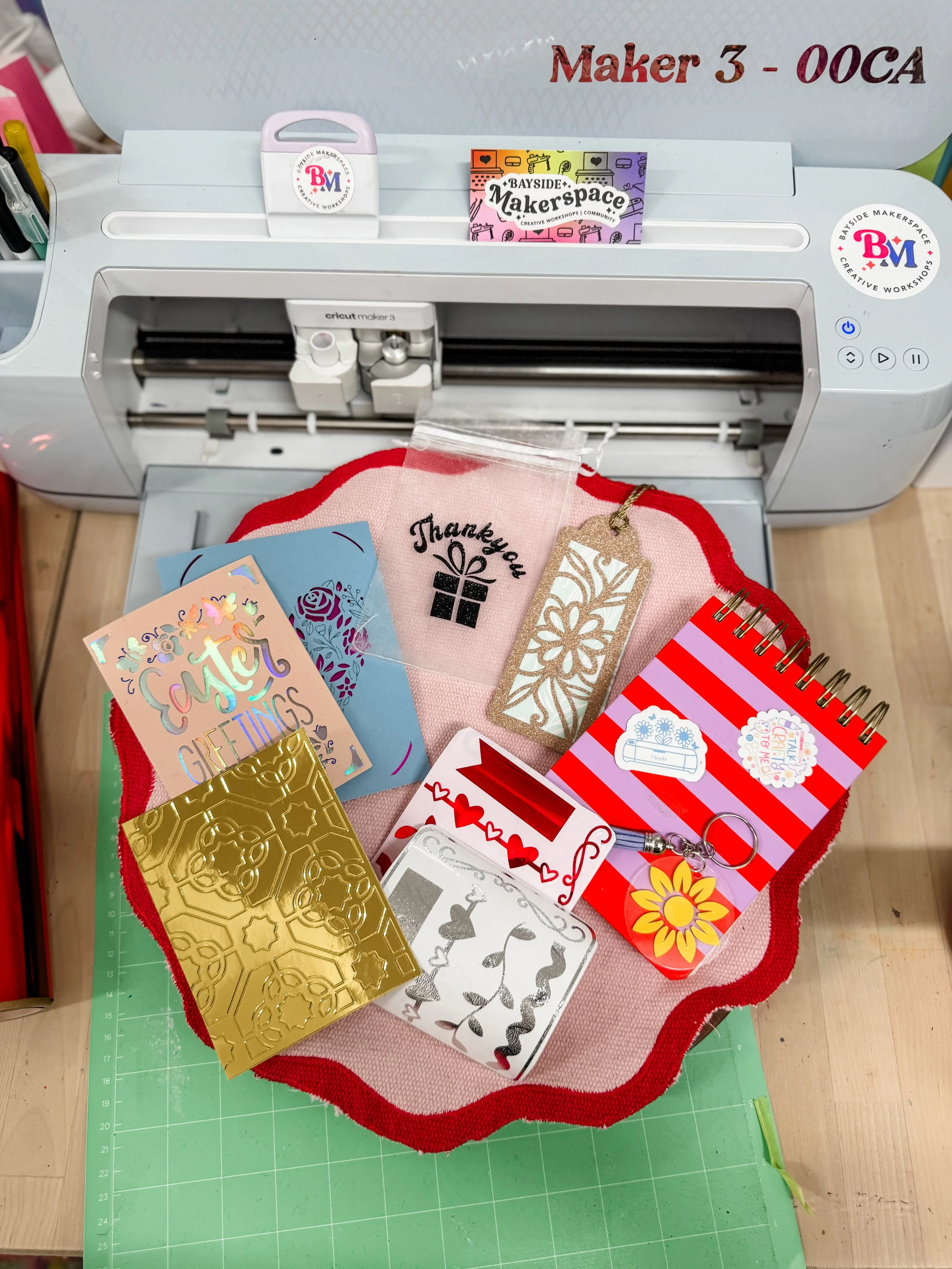
So that you can enjoy the Cricut chat some more you have a goodie bag of Cricut crafts, some you can assemble yourself!
Designs and items may vary between packs but please watch the tutorials to learn how to assemble your goodies to understand the scope of the Cricut machines.
Heat Transfer Vinyl (HTV) Custom Gift Bag (weed and apply with heat) the perfect way to customize a special gift. Tutorial below.
Vinyl Keychain (weed and apply) the quick and easy but throughtful gift idea. Tutorial below.
Greeting Card - see how the functions such as Draw and Cut and layering can turn your card-making up a level!
Stickers - use these stickers made using the Print Then Cut function to decorate your craft room.
Scrapbooking / Junk Journalling embellishments - use these ready to make tapes and shapes for your scrapbooking projects, some may be made made from vinyl and others glitter canvas or fabric, all are custom designed embellishments cut on the Cricut (yes you can cut fabric with a Cricut using a Rotary Blade!)
What custom decorative tape would you make?
Bookmark or Gift Tag - Attach the Tassel or Ribbon to attach the layered cardstock cut by Cricut machines to create simple but beautiful projects using patterned cardstock. Looking for a project to use the pretty paper you’re too scared to use this project is the perfect example of how to use and enjoy the “pretty paper”.
A sample of a Debossed foil card - use this however you like, this is to show you what the “Deboss” function can do to enhance your craft projects, no plates, no dies needed.
All of the designs used to create the projects in the Craft Pack were from the Design Space software, adjusting size and styles to suit the project needs showing how the Cricut can be a versatile craft tool.
Heat Transfer Vinyl (HTV) Gift Bag Tutorial
Vinyl Key Chain Tutorial
USE YOUR $25 CREATIVE CREDIT
〰️
USE YOUR $25 CREATIVE CREDIT 〰️

✂️ Cricut Design Space 101 Getting Started for Absolute Beginners New to Cricut or feeling overwhelmed by Design Space? Cricut Design Space 101 is a calm, step-by-step course for absolute beginners. Learn how to install and navigate Design Space, understand free vs paid content, customise ready-to-make projects, and move confidently from canvas to cut with clear, on-screen guidance. Course demonstration using Desktop version of Design Space applicable to all models of Cricut machines.